TT2EXP Instructions
See Instructions on how to use the app below (scroll down)
Version History
Note: to work with Expedition 12.8.3 or newer, you must upgrade to version 2 of TT2EXP
Update V2.1 (08/09/2026):
- Ability to select class where multiple classes are in the same URL
- Note: Some users may need to enable Rx Lat and Lon in the UDP settings to receive Boat Positions
Update V2.0.5 (01/07/2026):
- Boat names now sent to EXP via UDP, eg: Comanche (3s), where (3s) is the time since the last position was recieved.
Update V2.0.4 (26/06/2026):
- Fixed issue where Tractrac marks are added to the active route. TT2EXP will first create and make active a new route called TT, then put the marks for the first lap of the course in.
(ALWAYS DOUBLE CHECK THE ROUTE IT CREATES AGAINST THE ACTUAL COURSE) - Upon detection of a course change, TT2EXP may create a new course called TTchange1, TTchange2 etc. This is still in development.
Update V2.0.3 (26/06/2026):
- Updated to work with Expedition 12.8.3 and newer.
- This version will NOT work with older versions of Expedition
- Fixed bug in Websocket loading that caused websocket to reload all history every 5 seconds.
Update V2.0.2 (26/06/2026):
- Updated to work with Expedition 12.8.3 and newer.
- This version will NOT work with older versions of Expedition
- Removed DLL writing and switched to UDP data transfer from TT2EXP to Expedition
- use 127.0.0.1 as IP address in both TT2EXP and EXP if you run the app on the same PC as Expedition, otherwise…. well you will figure it out.
- Boat tracking simplified for stability of the app. More detailed boat tracking may come back when I have time to improve it.
Update V1.7.1 (01/06/2026):
- TT2EXP lite added, this contains marks only, no boat tracking.
Update V1.7 (30/05/2026):
- Updated DLL wrapper to better handle marks.
Update V1.6 (29/05/2026):
- Light / Dark mode toggle at the bottom right (next to the about button)
Update V1.5 (24/05/2026):
- Codebase updated and streamlined to run with less system resources and diskspace
Update V1.4 (10/05/2026):
- Paste button to paste the URL from clipboard, makes it easier on a tablet
- Export marks to GPX format button.
Update V1.3 (29/04/2026):
- Bug fixes for Auto-refreshing
Update V1.2 (28/04/2026):
- Added 5 second forced position refresh (still a WIP)
- Added a “number from” question when autonumbering boatID’s so that you can number from say 20, leaving the AIS tracked targets in Boat ID’s 1 to 19 in Expedition alone)
INSTRUCTIONS (updated 26/06/2026)
RACES:
- TT2EXP works with LIVE races. It will load old races, but not really do much.
- Find the race’s URL by visiting Events – TracTrac. Click the event you want, then the race you want (while it says “Live”). Then copy the URL from the address bar at the top of your browser window.
- Paste the race URL into the URL field at the top of TT2EXP and click “Load Race”
MARKS TAB:
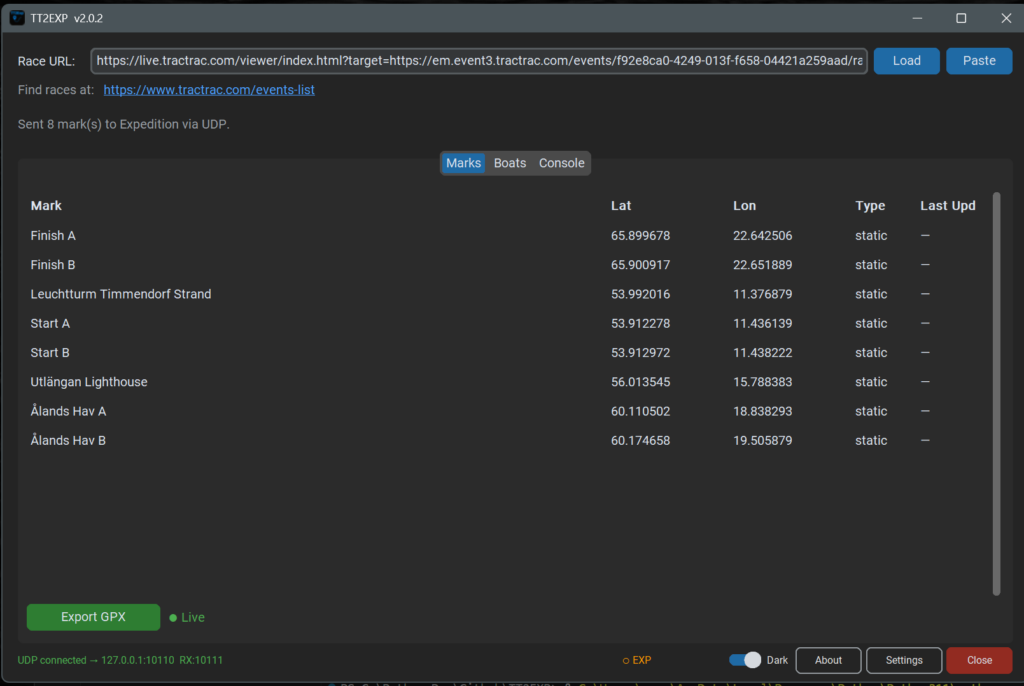
- Static TT marks, which are marks that the organisers add coordinates in the tracker for (eg: cardinal or island)
- Live Marks, which are marks that the organisers add a tracker to and it updates the position live. These will automagically be sent to EXP and update every time they change position automagically.
- Marks in EXP will have a prefix TT and be in a folder called Expedition so you can quickly see they came from TT2EXP app.
- If you need the marks in another program, you can also export a GPX file, could be handy if you are using Sailing Performance software.
BOATS TAB:
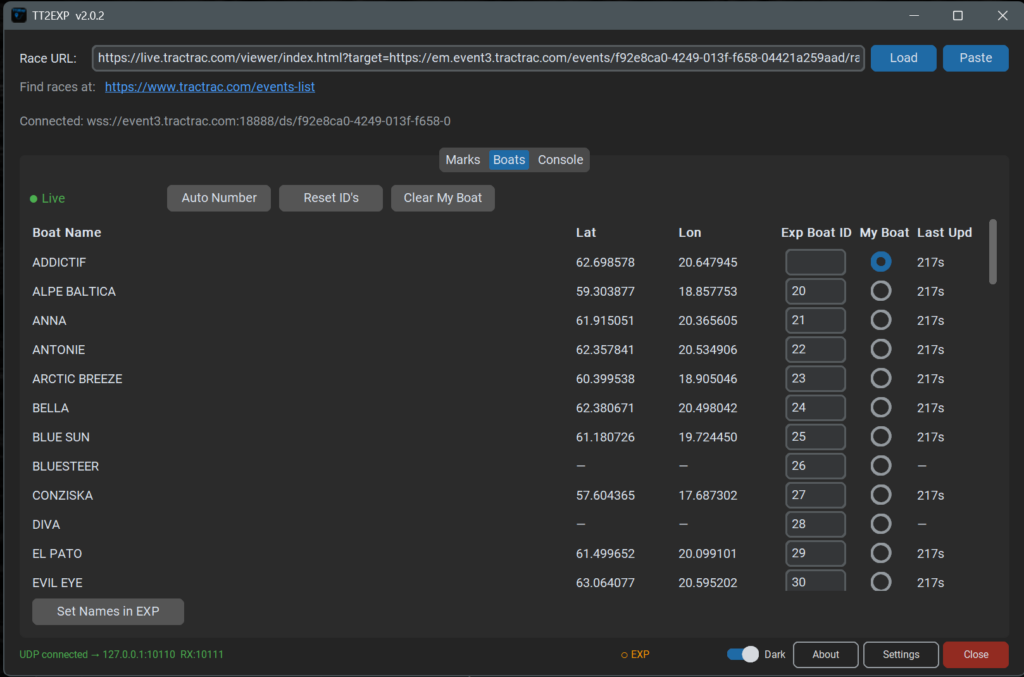
- This has been simplified a lot in Version 2 so as to make the app more stable. It may become more detailed in the future when I get some time to work on it.
- The MyBoat selection is so it wont number your own boat and thus you would then get a second tack following you around.
- TT2EXP will list all the boats, You can then assign EXP BoatID’s manually or automatically using the “Auto Number” button which will assign a number starting at 1.
- To send the boat names to Expedition requires a bit of a process – I am working on this with Nick to improve it.
Step 1: Click the “Set Names in EXP” button.
Step 2: Follow the instructions in the popup window and close EXP
Step 3: When EXP is fully closed, click OK
Step 4: Open EXP again
It has to work this way for now as EXP only loads the Boats.XML file on startup.
UDP CONNECTION
SETUP in TT
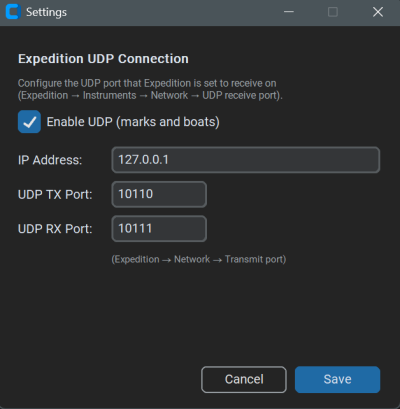
- IP address should be 127.0.0.1 if you are running TT2EXP on the same PC as Expedition
- If you are running TT2EXP on a different PC to EXP then put the IP address of the EXP PC in here
- Port Numbers need to be unique, choose something in the 10xxx range.
Make the Tx value 1 lower than the Rx Value
UDP CONNECTION
SETUP IN EXP
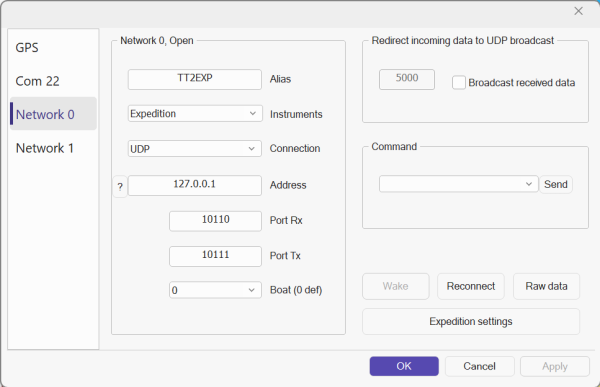
- Instruments must be Expedition
- Connection must be UDP
- IP address must be 127.0.0.1 if you are running TT2EXP on the same PC as Expedition
- If you are running TT2EXP on a different PC to EXP then put the IP address of the TT2EXP PC in here
- Add the Tx Value from TT2EXP into the Port Rx in Expedition
- Add the Rx value from TT2EXP into the Port Tx in Expedition
- In Expedition settings (bottom right of the network connection window)
- Everything in EXP Rx filter EXCEPT Latitude and Longitude should be turned off. The Marks tick box should be ticked (formally Receive marks)
- Everything in EXP Tx filter should be turned off. TT2EXP only used the Return UDP data from EXP for an Acknowledgement
DISPLAY SETUP IN EXP
- You will need to turn on tracking for boats from Settings > Display > Racing tracking – Tick Boats and Tracks
- It can be also helpful to display names from Settings > Display > Boat – Tick Name
- Settings > User will show the list of Boat ID’s and you can choose the colour there. (and also reset the names)
- Settings > Track, then tick “other boats” will draw the track of the boats as they sail.
Feedback welcome, even if I might not get to updating immediately.
Although its fun to watch some races like the ILCA’s and have 60 boats being tracked in EXP.
And remember if you like it and want to help support me to keep it updated and develop new apps, please consider donating